Piggy Sheet Vault
Original receipts, reviewed details, categories and merchant information—all together on your iPhone.
 Piggysheet
Join the waitlist
Piggysheet
Join the waitlist
The photo. The line items. The bigger picture.
Keep your captured receipts and reviewed spending together in one beautiful Excel file.
PREMIUM FEATURE Unlocked during beta testing.
Launch pricing will be confirmed before release.
The real picture.
Right there in your sheet.
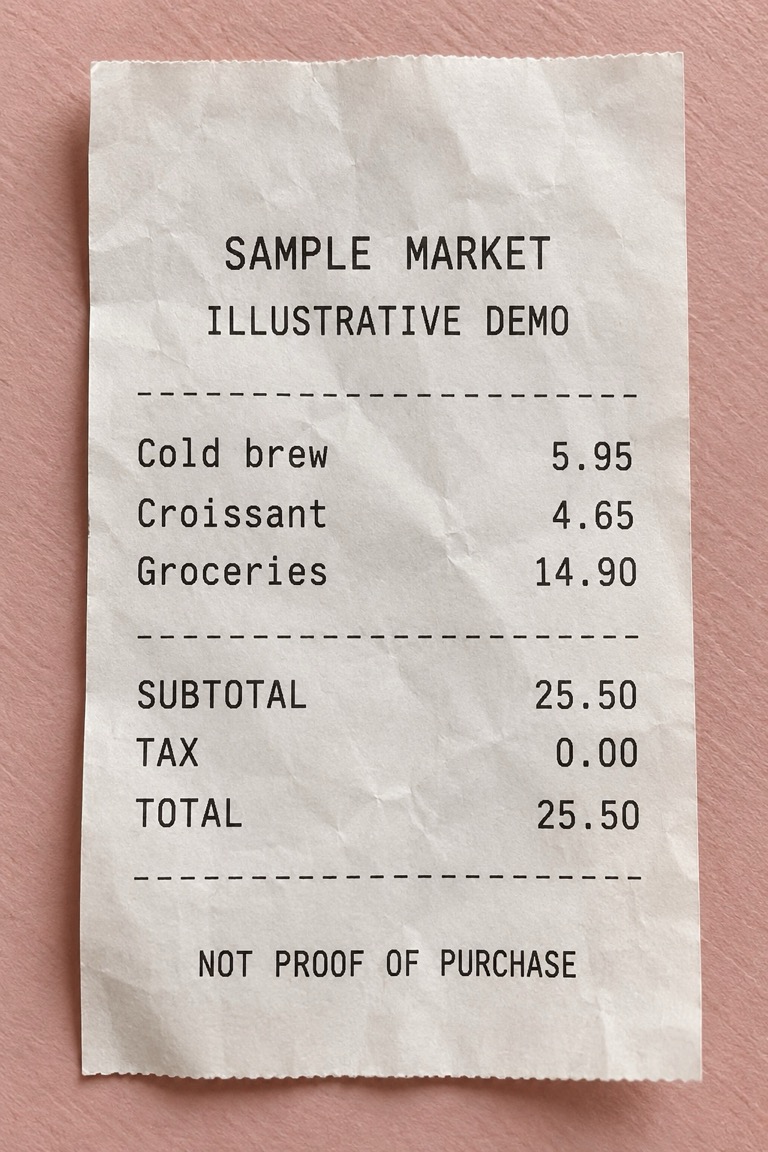
Your picture travels with your spending story.
✓ Inside this .xlsx fileEvery reviewed item. Its own row.
| Item | Amount | Currency |
|---|---|---|
| Cold brew | 5.95 | USD |
| Croissant | 4.65 | USD |
| Groceries | 14.90 | USD |
| Selected total | 25.50 | USD |
Separate line items alongside your receipt picture. An export snapshot, not a live connection to the app.
Only selected receipt spending. Not your complete spending, a bank statement, or confirmed savings.
Illustrative animation: scan a fictional receipt, review three separate line items, choose to include full pictures, then create a Receipt Book Excel file containing that picture, line items and a dashboard. Use the steps or workbook tabs to explore, or pause the animation.
Illustrative demo with a fictional receipt, not live OCR. Review details before saving. Receipt Book exports happen in the iPhone app. Save off-device for safekeeping; a Receipt Book is not cloud sync or a restorable Vault backup.
Try the Piggy What-If Lab Read the Piggy blog
EVERY PIGGY BANK NEEDS A PIGGYSHEETNot another pile of photos. A place to see the little purchases, organize the important ones, and build a plan you actually chose.
Original receipts, reviewed details, categories and merchant information—all together on your iPhone.
Explore recorded item spending by week, month or year. A mixed basket stays a mixed basket until you choose what belongs together.
Itemized CSV, accounting CSV and pink Excel workbooks. Keep currencies separate and choose the receipts you want to export.
Feed Your Piggy gives your savings goal a home, too. Set a target, record your own contributions, and explore a timeline—not a promise of bank-verified savings.
Scroll a little.
See the bigger picture.
Rent, groceries, eating out, savings. Start with income, choose what you want to spend, and give your month a little breathing room.
Meet Create My PiggyTargets you choose. Not bank-connected spending.
A little context goes a long way. Share selected expenses, explain what changed, and request an allowance increase in your own words.
Try a family requestSeparate business and personal portions, organize tax records, and export a clean workbook for your accountant.
Explore business reports| Expense | Business | Personal |
|---|---|---|
| Office supplies | $83.35 | $0.00 |
| Internet | $48.00 | $32.00 |
| Software | $29.00 | $0.00 |
No automatic deduction eligibility. Pink, professional, mascot-free business exports.
One question at a time. Solo or joint income. Weekly, biweekly or monthly pay. Then the targets you want—not the ones someone else picked for you.
Try sample numbers. Nothing is saved or sent.
Weekly × 52 ÷ 12. Other expenses, tax reserves and savings contributions aren't included in this example. This is a plan, not your complete spending.
Recorded item totals, not an estimate of every purchase you made.
See confirmed item spending across saved receipts. Explore possible repeat purchases, then decide whether they're a habit. Merchant repetition alone doesn't make one.
Price Check helps compare compatible products using your reviewed history and supported public benchmarks. No invented national averages. Straight Talk adds optional, non-shaming Piggy humor.
A meal price changed. A new bus route costs more. Explain the difference, attach the selected evidence, and ask for the amount you choose.
Add your own note and an optional photo in the app. The pink family workbook brings Piggy along; the iPhone share sheet lets you choose Messages, WhatsApp or another available app.
Manual demo inputs, not verified receipt evidence. Nothing is sent automatically. The requested amount is yours to choose—not an entitlement.
Personal, family or business—choose the report that fits the conversation.
Dashboard, receipts and line items. Explore recorded spending with currencies kept separate. Opt-in Piggy Plan views add guarded savings scenarios.
Exports are snapshots. Workbook edits don't change the app. Re-export after app changes.
| Merchant | Category | Recorded |
|---|---|---|
| Sample Market | Groceries | $25.50 |
| Sample Café | Eating out | $10.60 |
| Sample Station | Transportation | $30.00 |
| Selected total | $66.10 | |
Capture a receipt, inspect the original, edit the merchant or line items, and save it. Browse by date, explore categories, and keep the details you need.
OCR can make mistakes. Review first. Vault backups aren't encrypted; keep them private.
The iPhone beta is being prepared. Request beta information below. App Store and TestFlight links will be added when they're ready; there is no public download link on this page yet.
No. This build uses saved receipts and the numbers you enter. Missing receipts mean incomplete coverage—not zero spending or confirmed savings. Joint budgeting is a plan you enter, not a connected household account.
No. Create My Piggy supports a tax reserve you choose. Business & Tax Organizer keeps business use, deduction amounts and review status separate. Tax eligibility and filing belong with you and a qualified tax professional.
You preview the message and choose what to share. The app opens the iPhone share sheet; you select a recipient and send it yourself. Piggy never promises an allowance increase.
Current receipt processing and storage are local to the iPhone; cloud sync is not enabled. Income and monthly-budget data are not included in existing receipt exports or Vault backups. Device backups may include app data. Selected notes or photos are shared only when you choose them.
No. Every receipt, number, workbook and message on this page is illustrative. The interactive examples calculate locally in your browser. This site doesn't upload receipts, save your budget or send messages.
Illustrative monthly target remaining
$350.00Fictional example: $500 spending target minus $150 recorded personal spending. Not a bank balance or confirmed savings. Missing purchases change the picture.
Meet Create My PiggyCOMING SOON FOR IPHONEBe first to hear about launch and beta availability.
Meet Piggy Post for useful weekly money questions.
Try the free What-If Lab today.
Launch availability and pricing will be announced.